Pylon
A job board for electrical contractors that shows the crew, the money and the paperwork in one place: who is on site right now, what is booked, which invoice is late, and where the next contract is coming from.
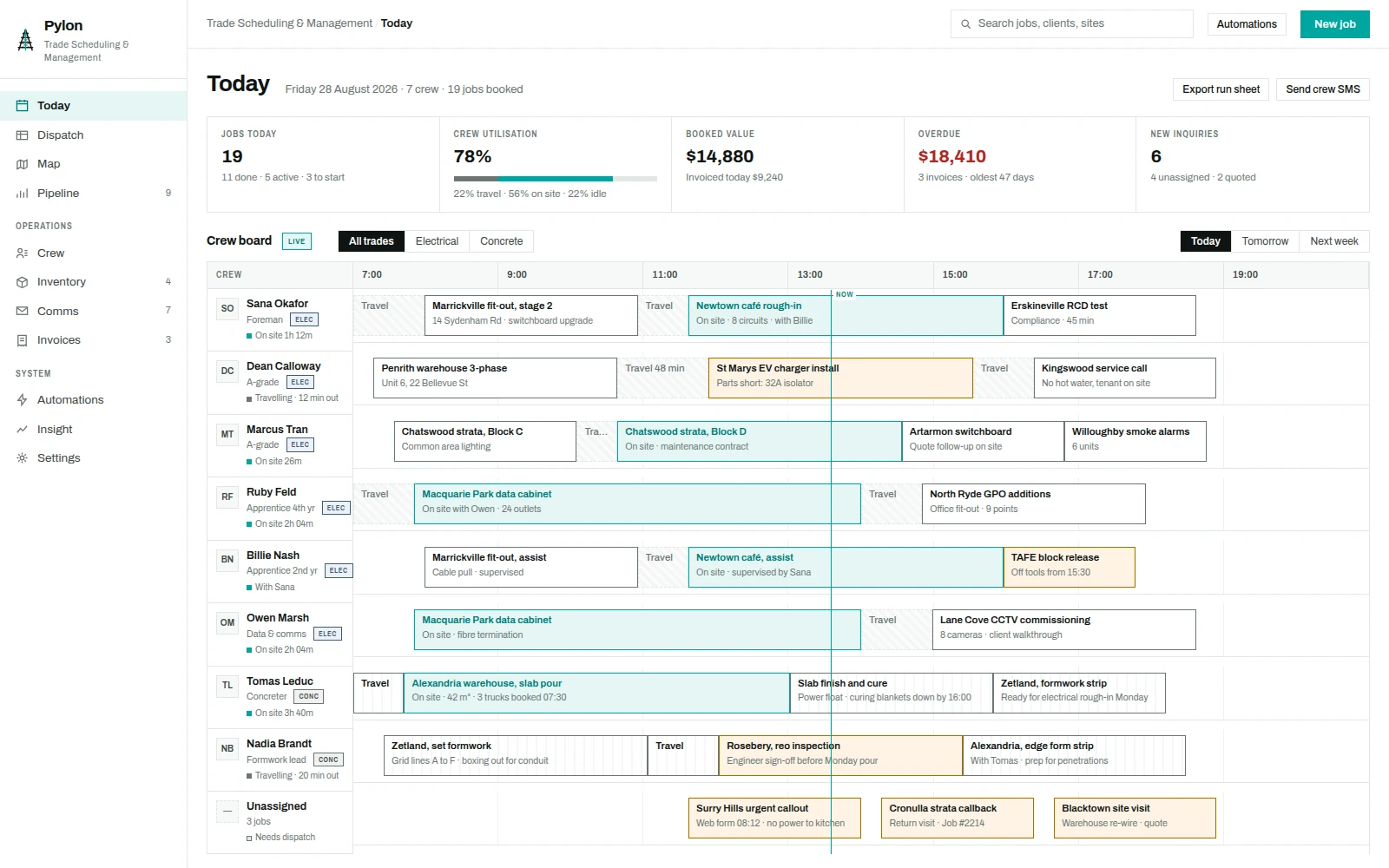
Crew, jobs and payments
Electrical contractors run on three systems that do not speak to each other: a scheduling whiteboard, an accounting package, and a phone. Pylon is the tool that holds all three. It answers the questions a working day actually asks, in the order they get asked.
Who is on site and who is still driving. Which job is at risk because the part is not on the van. Which quote is sitting unanswered and what it is worth. Which invoice is 47 days late and what has already been sent to chase it. And when a job finishes, how quickly the money can be in the account.
One job, end to end
Completed work, client acceptance, invoicing and payment stay attached to the same job.
Invoice on site
The tradie raises it on the spot, priced from the job: labour hours by name, cable by the metre, parts by unit.
Signature captured
Client signs on the crew phone with the electrician standing there, or by emailed link if nobody is on site.
Received in Pylon
Signature, timestamp, device, location and hash land in the office. The job closes and the evidence pack builds itself.
Paid and answered
Stripe captures the card, posts the event back, and the receipt email goes out under the contractor's branding.
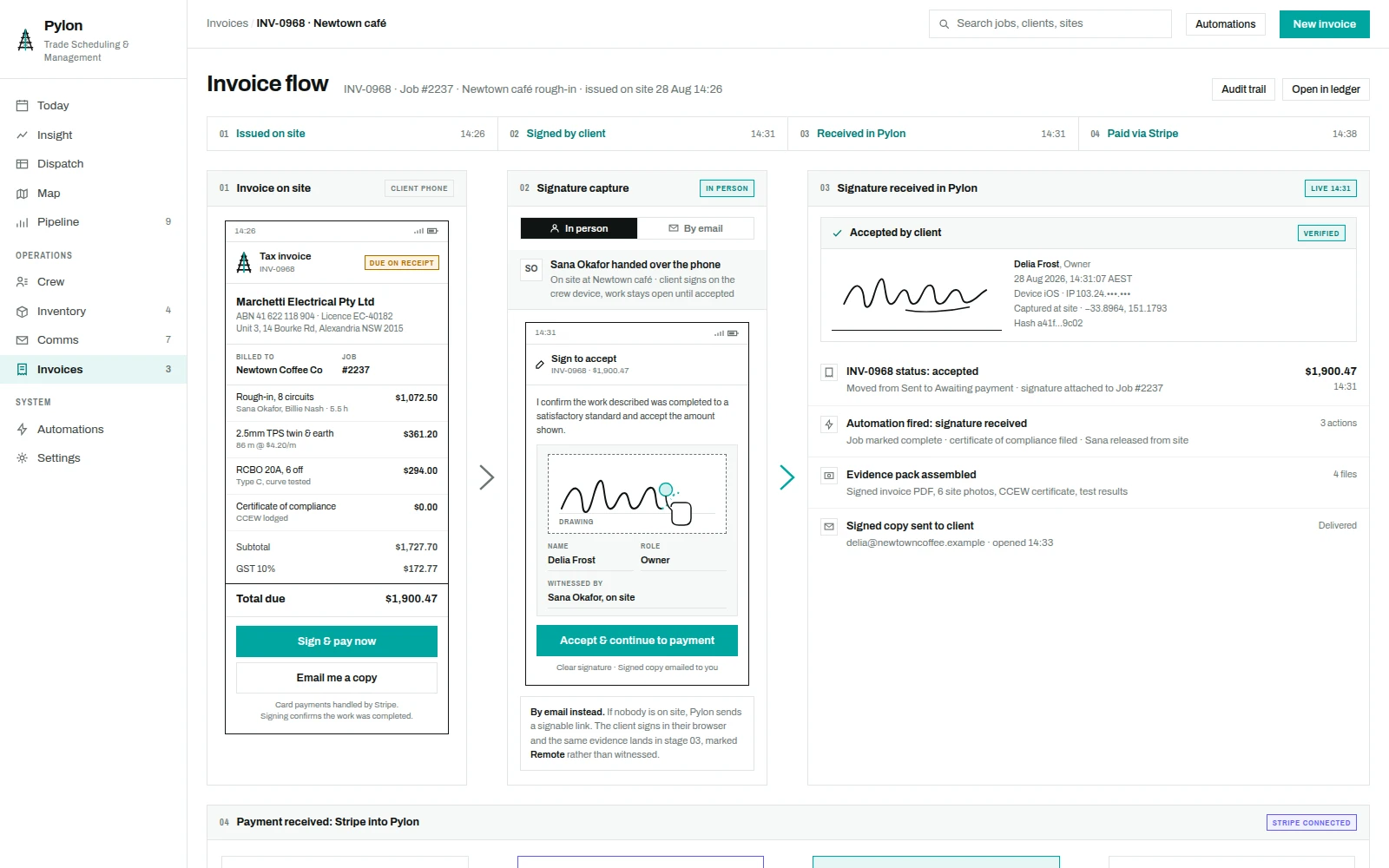
Signing, with someone standing there
Most on-site signatures are collected by a tradesperson handing over their own phone. Pylon treats that as the default: the crew member is named as witness, the finger is mid-stroke on the pad, and the job stays open until the client accepts. If nobody is on site, the same document goes out as a signable link and comes back marked remote rather than witnessed.
What arrives in the office is not a picture of a signature. It is the mark plus the signatory's name and role, the timestamp to the second, the device, the site coordinates, and a document hash, all attached to the job it belongs to.
I confirm the work described was completed to a satisfactory standard and accept the amount shown.
Card payments handled by Stripe · Signed copy emailed to you
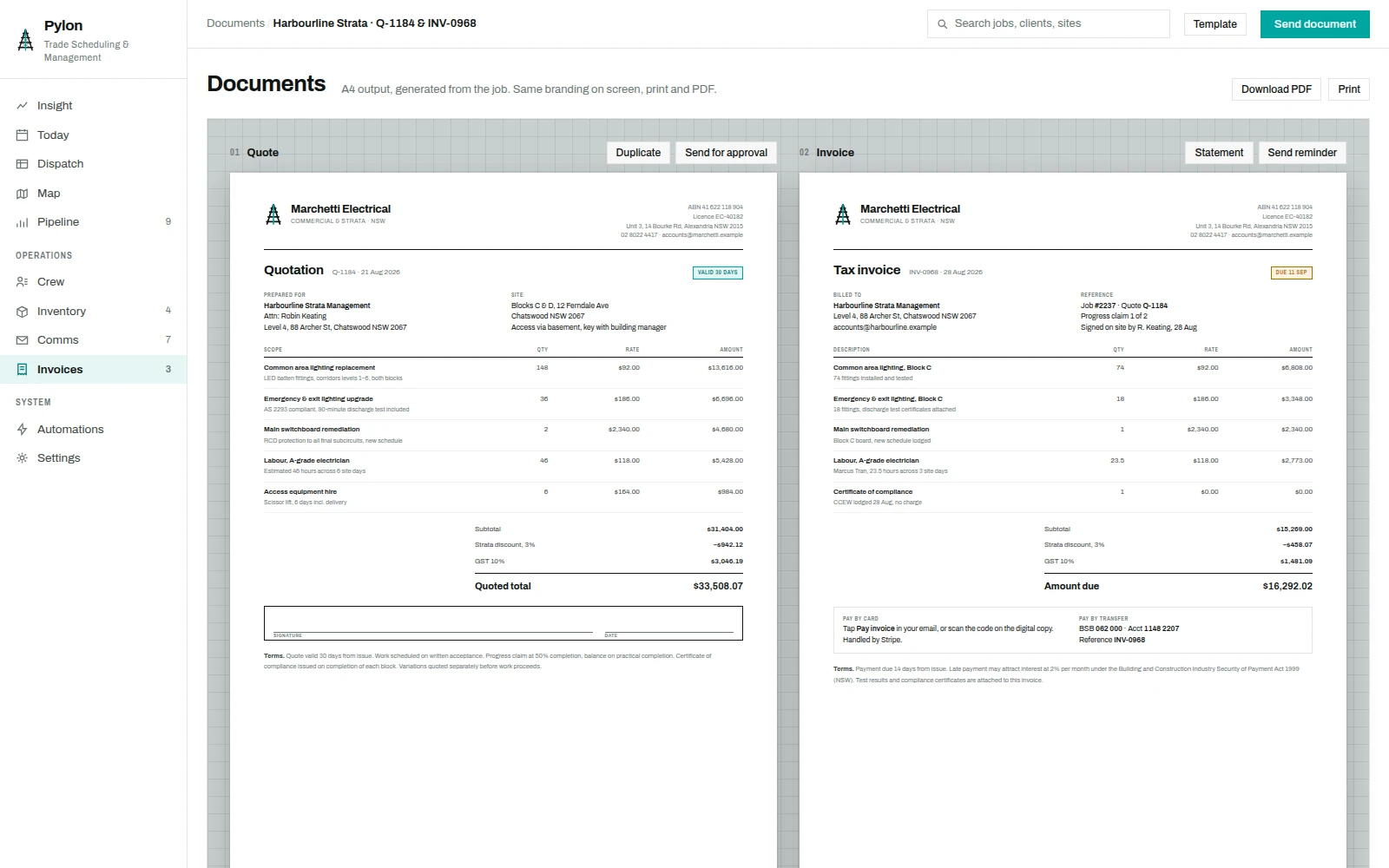
Quotes and invoices
A quote is the first thing a client sees and the last thing they compare, so it is designed as a document rather than a screen export. Both quote and invoice print to A4 on the same sheet, carrying the contractor's identity, licence number, scope by line, discount and GST in a fixed order, an acceptance block, and the terms that make it enforceable.
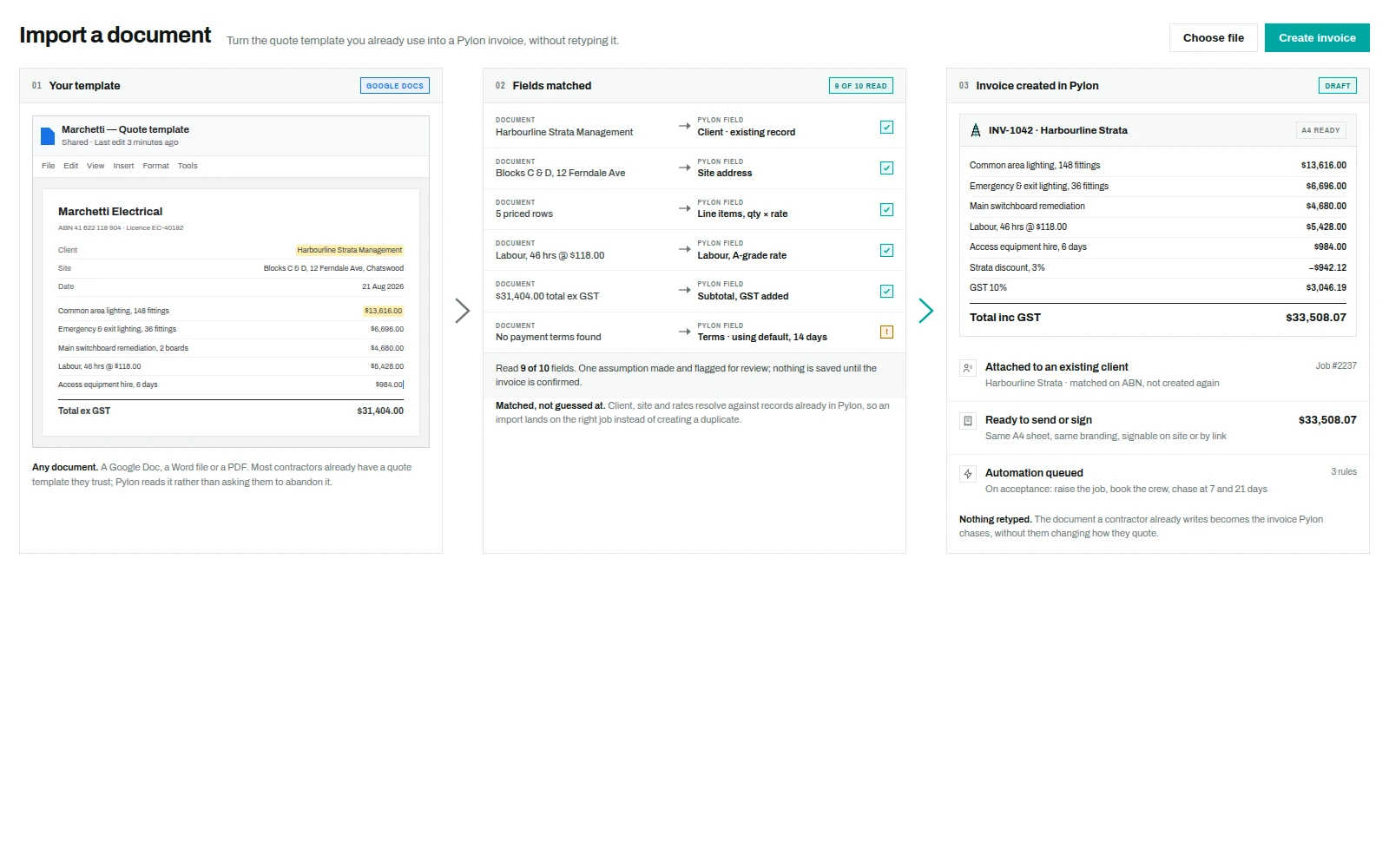
The template they already use
Most trade businesses already quote from a document: a Google Doc or a Word file that has been copied and edited for years. Asking them to abandon it is how software gets rejected. Pylon reads the document instead, matches what it finds against records that already exist, flags the one thing it had to assume, and produces the invoice.
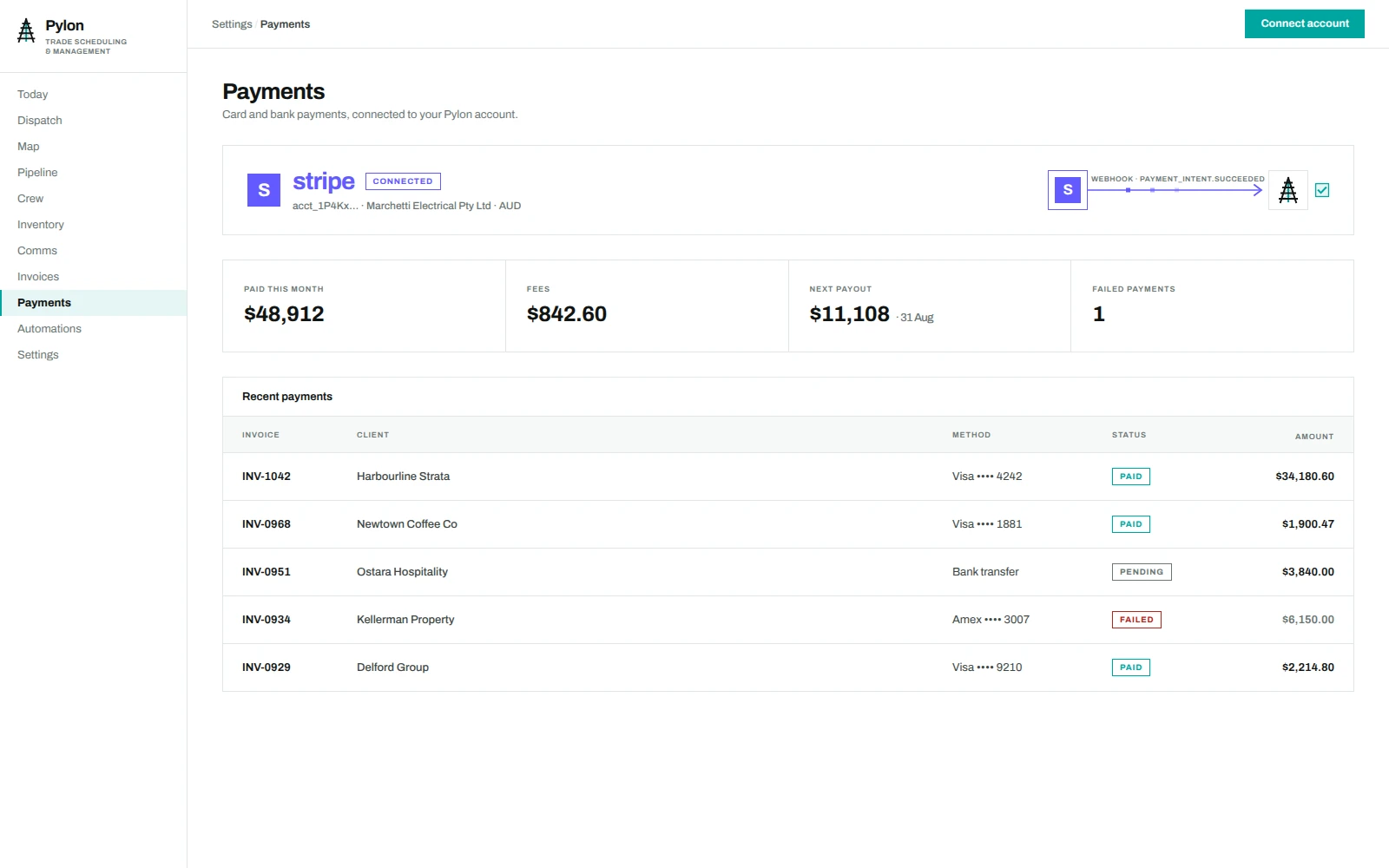
Money arriving, not just money owed
Client card payments through Stripe update the invoice, job, aged debt and daily cash. Receipts and review requests follow the payment.
The connected account, cleared and failed payments, and upcoming payouts stay together in payment settings.
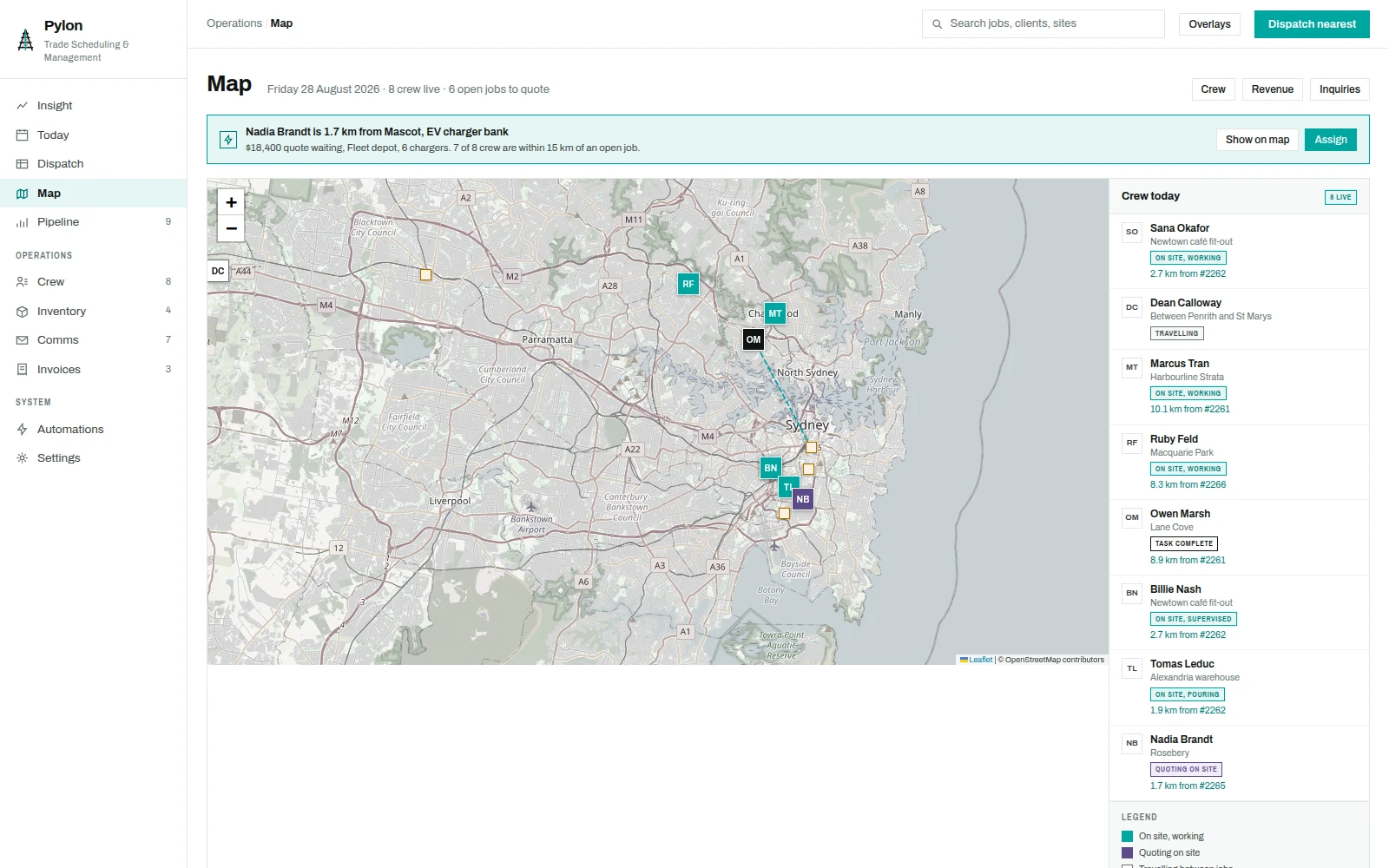
Crew locations
Eight crew across greater Sydney, with their current job, booked value and nearby unassigned work. On site, quoting, travelling and available states stay visible with each location.
The intelligence is the last part. Pylon measures every unassigned quote against where the crew already stand, and when a job falls inside fifteen kilometres of someone who has just finished, it offers that job to them rather than sending another van across the city.
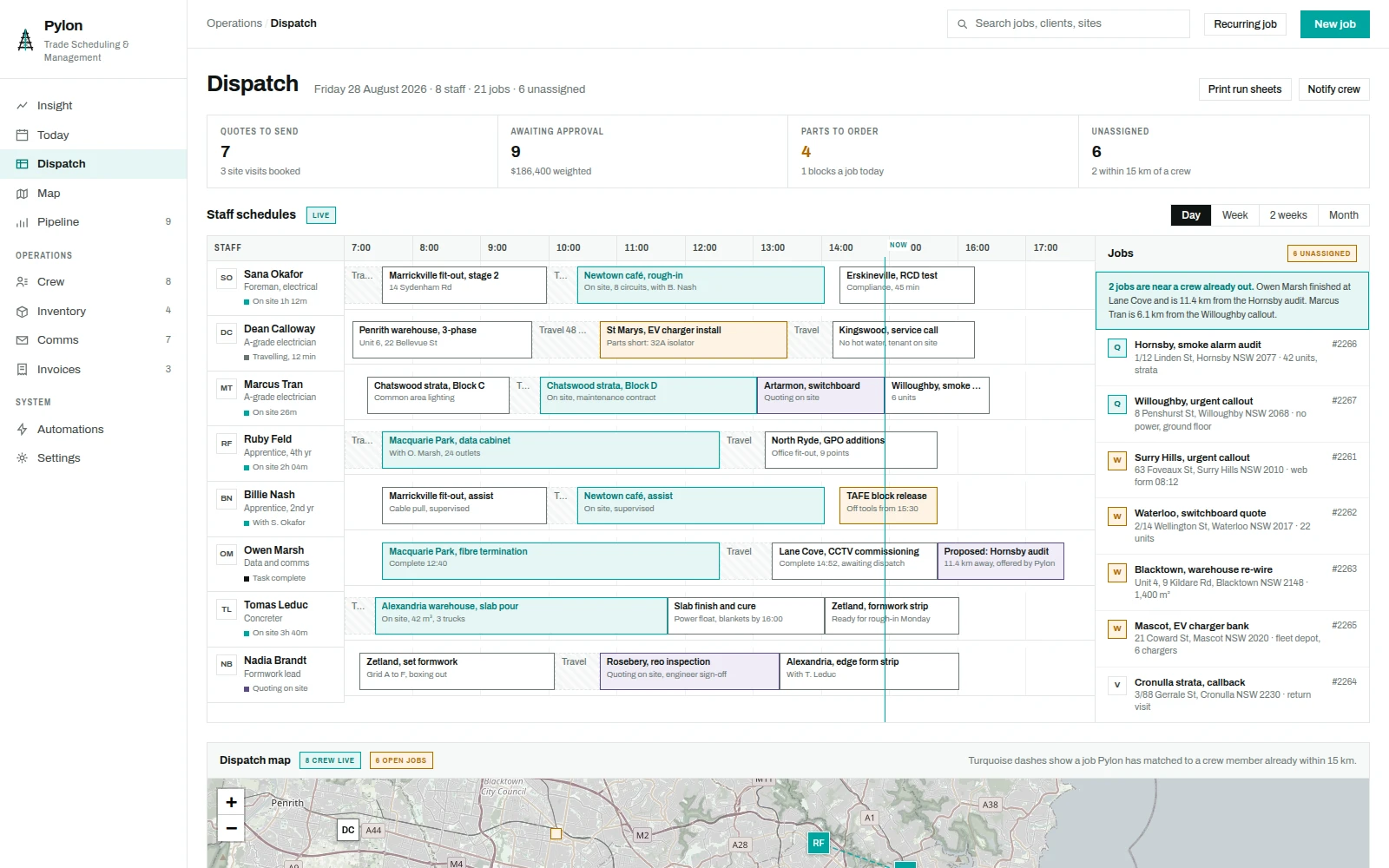
Dispatch
The dispatch board is the scheduler's screen: eight staff rows against the working day, the job queue on the right, and the same map underneath so a decision about who takes the next call can be made without leaving the page.
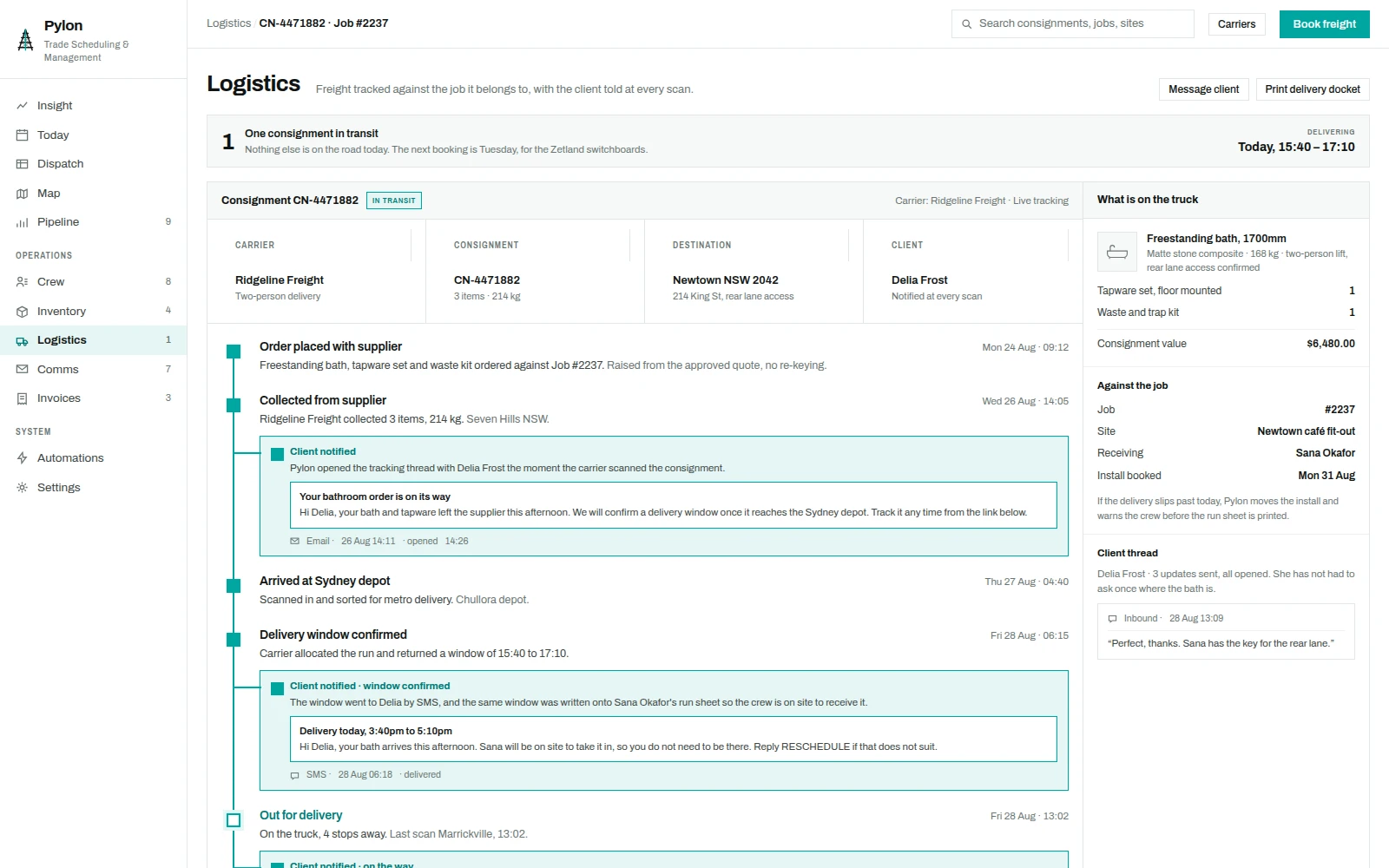
Freight, and the client who is waiting for it
A bath does not arrive by itself. Pylon books the freight against the job, tracks the carrier's scans down a single timeline, and branches at each one to show what the client was told. The contractor sees the consignment; the client sees a plain message saying where their bath is and who will take it in.
When there is exactly one thing on the road, the screen says so before it says anything else. A delivery window arriving at six in the morning goes out by text and onto the crew's run sheet in the same movement, so somebody is on site to receive it.
Into the books
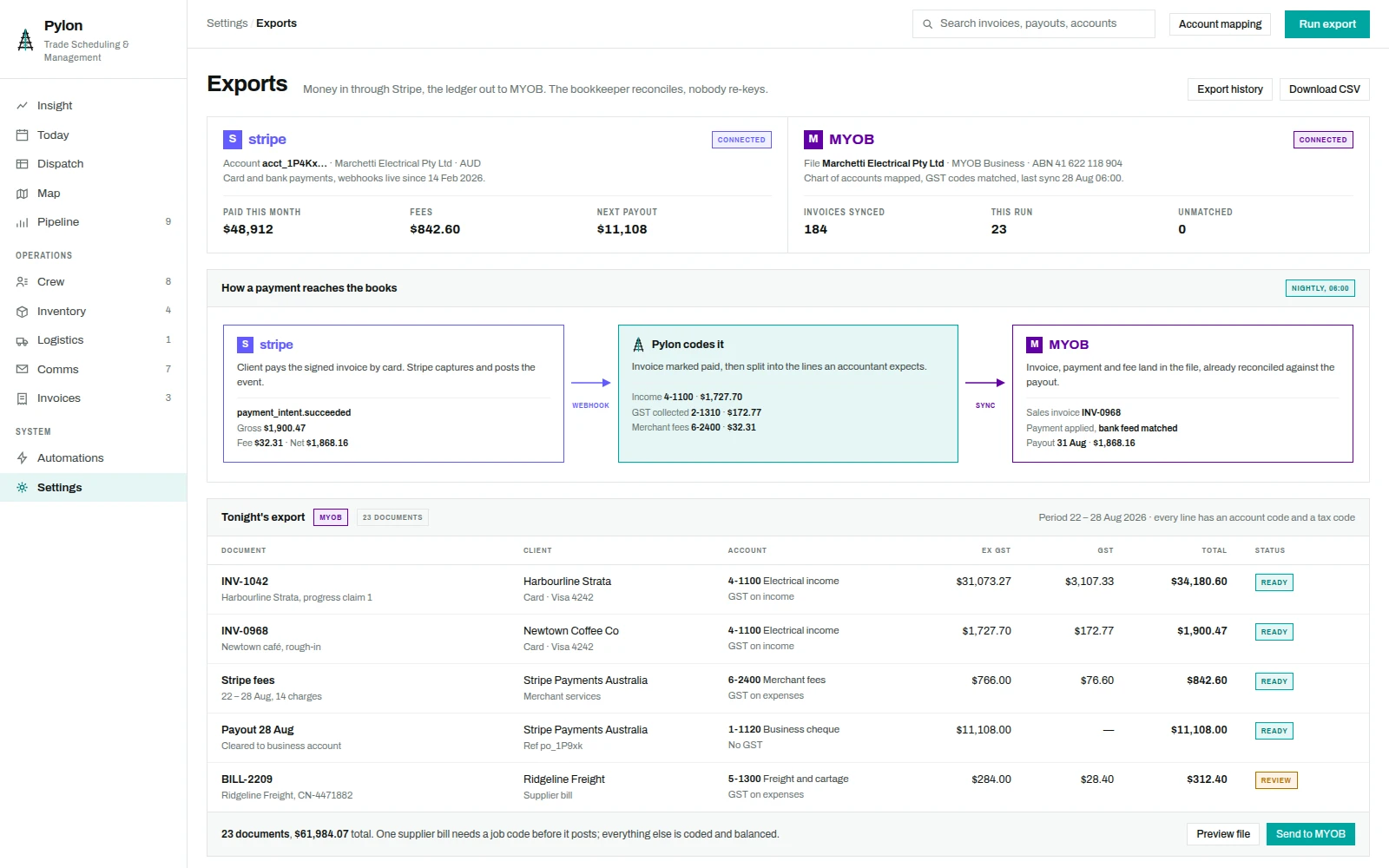
Money arrives through Stripe and leaves for the accounting file. Pylon sits between them and does the part bookkeepers usually do by hand: splitting a payment into income, GST collected and merchant fees, coding each to the right account, and posting it so the bank feed matches the payout without anyone re-keying a figure.
Income and receivables
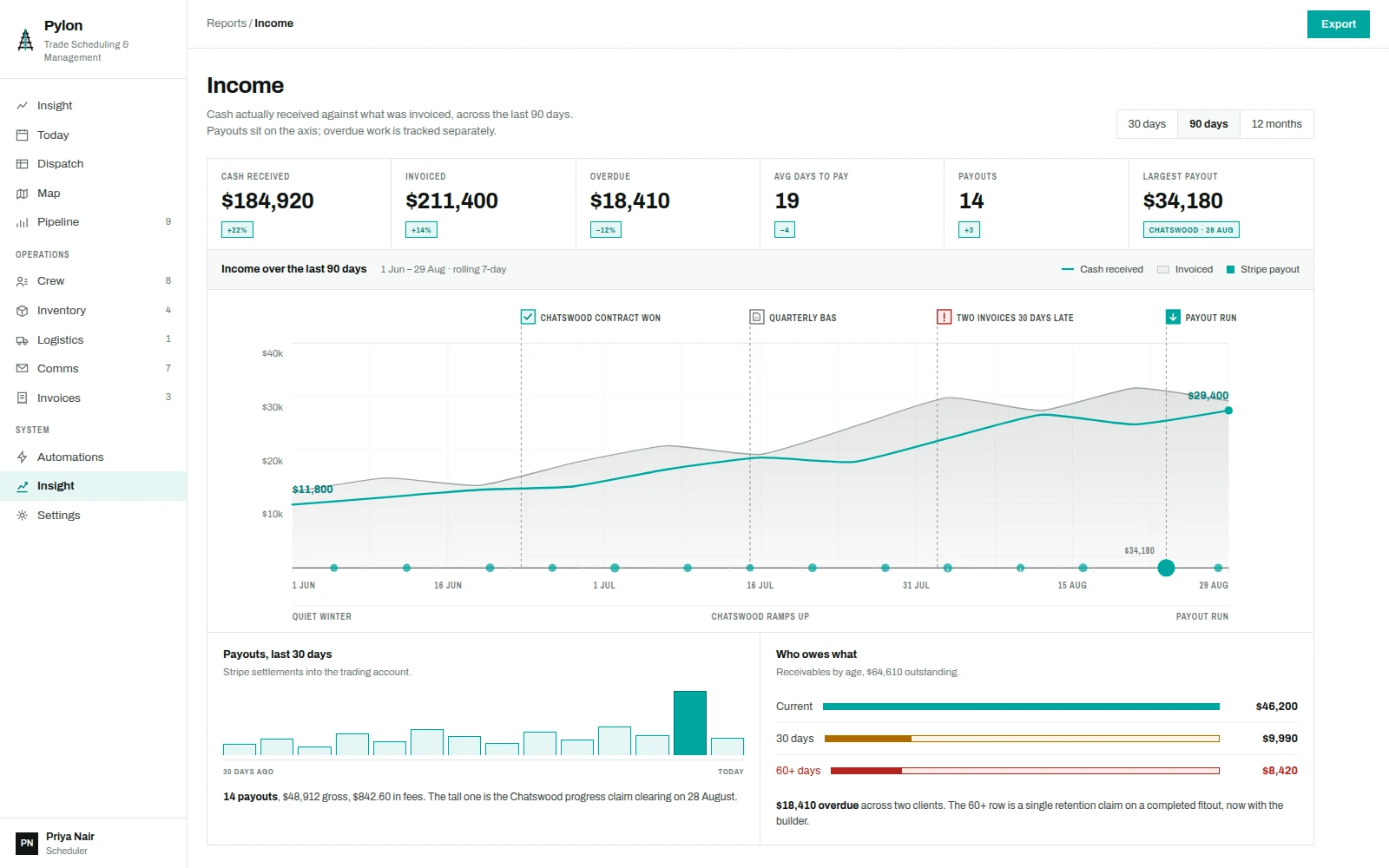
Cash received against cash invoiced, over ninety days, with the events that moved the line marked on it: the quarter the Chatswood contract landed, the BAS, the fortnight two invoices went thirty days late, and every Stripe payout sitting on the axis, sized by what cleared.
The rest of the system
Beyond the screens above, Pylon is planned as one operations picture for the business.
Revenue and inquiry overlays
The same map, re-skinned: suburb heat by revenue banked this quarter, and inquiry pins tagged by the channel they arrived on.
Pipeline
Proposals from inquiry to contract, each carrying value and probability, with the weighted total against the raw.
Inventory in two tiers
Van stock with per-vehicle minimums and job-committed levels, plus warehouse plant and test instruments that expire on a calibration date.
Communications
Every channel in one thread per client: web form, phone, SMS and email in, quotes, confirmations and receipts out, approvals and photos back.
Invoices and chasing
Aging by column, a chase list ranked by days late against amount, and a record of every reminder already sent.
Automations
Trigger, condition, action. Job completed raises a draft invoice; stock below minimum joins the Thursday order; an inquiry in the city auto-assigns.
Running a trade business on three systems that don't talk?
Crew, quotes, invoices and payments in one place.